 Adwell
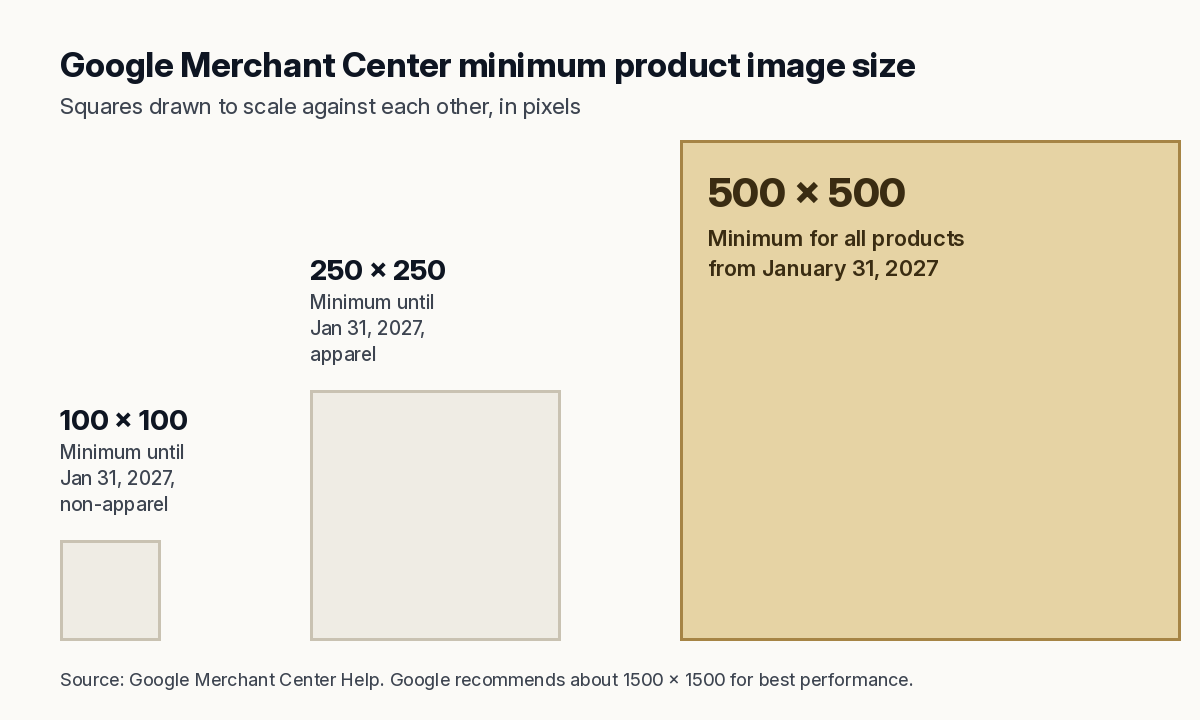
Short answer: from January 31, 2027, every product image you send to Google Merchant Center, the main image in image_link and each extra image in additional_image_link, must be at least 500×500 pixels. That applies to all product categories and marketing methods. Until then, the old minimums of 100×100 pixels, or 250×250 for apparel, still apply, and Google is already warning about images between the old and new sizes.
If your Shopify catalog has older product photos, supplier images, or small thumbnails, some of them are probably under the new size. Replacing them now is easier than finding out from disapprovals after the deadline. A free scan with Adwell: GMC Suspension Check shows you in minutes where your store stands and which products to fix first.
This guide covers the old and new Google Merchant Center image size requirements, how main and additional images are treated differently, what happens to images that fall short, and how to find and replace small product images in Shopify by hand. Only Google decides whether a product is approved.
What changes on January 31, 2027
Google announced the change in its Merchant Center product data specification update for 2026. Google is raising the minimum resolution for images in the image link and additional image link attributes to 500×500 pixels across all product categories and marketing methods, with enforcement starting on January 31, 2027.
The old minimums, until enforcement
Google's help page on how to fix Image too small says that until January 31, 2027 you can use an image of at least 100×100 pixels for non-clothing products and 250×250 pixels for clothing. For YouTube Shopping ads, images must already be at least 500×500 pixels to serve on TV.
The new minimum, from enforcement
From January 31, 2027, the floor is 500×500 pixels for every product. Google's image link attribute page now lists at least 500×500 pixels as the size requirement, and recommends images of about 1500×1500 pixels or more for the best performance in all listing formats. The upper limits stay the same: no image larger than 64 megapixels and no file larger than 16 MB.
When the warnings started
Google's announcement says it began issuing Merchant Center warnings on April 14, 2026, for images that do not meet the new minimum. Its Image too small help page says you will see these warnings starting July 2026. Either way, if your store has images under 500×500, the warnings may already be in your account.
Main image vs additional images
The new size applies to both attributes, but Google treats a small main image and a small additional image differently.
Main image: image_link
The image_link attribute holds your product's main image, the first thing shoppers see. Google's Image too small page explains that it disapproves products when they don't provide an image with the right dimensions. Today that means images under the old minimums. After January 31, 2027, it means main images under 500×500.
Additional images: additional_image_link
You can send up to 10 additional images per product. Google's additional image link page says that if you include images under the minimum size requirements, your product won't be disapproved, but those images won't be shown. So a small extra image will not take the product down, but it quietly drops out of your listing, and with it the angle or detail shot you added to help shoppers decide.
Which Shopify image becomes the main image
Feed apps decide which Shopify image goes where. A common setup sends a variant's own image as the main image when the variant has one, otherwise the product's featured image, which is the first image in its media list, and sends the remaining product images as additional images. Check a product in Merchant Center to see exactly which image URLs Google received, because that is what Google measures.
What happens to images under 500×500
There are two outcomes, and only one of them is in your control.
Disapproval. After enforcement, a main image under 500×500 puts the product at risk of disapproval, which removes it from Shopping ads and free listings until you fix it. Google's product data specification also says not to scale up an image or submit a thumbnail.
Automatic optimization. Google's announcement says it will also begin optimizing some images smaller than 500×500. Those optimized images meet the new requirements and prevent disapproval without any action from you, and they are marked with a warning in the Needs attention section. Google says some images, not all, so you cannot count on it for every product. And you do not choose how the optimized version looks. To replace an optimized image, Google says to submit a new image larger than 500×500 in your product data.
The safe plan is to treat every image under 500×500 as one to replace before January 31, 2027, and to treat automatic optimization as a safety net, not a fix.
A few small images are easy to miss in a large catalog, and they are usually the old products nobody has opened in years. Adwell's free scan gives you a risk score and a prioritized fix list in minutes, so you know which products to look at before the deadline.
How to find small product images
Start with Google's own list, then confirm the details in Shopify.
Check Merchant Center first
Google's Image too small page explains where the warnings live. In Merchant Center, open the Needs attention tab, select View history, and look in the warnings on the right side of the page for Image too small for upcoming enforcement and Image resolution optimizations applied. To get the full list, select View fix, then Download impacted products.
That download is the most reliable list of what Google itself measured. If you do not see either warning, your synced images may already meet the new size, but check again after you add new products.
Cross-check in Shopify
Match the downloaded product IDs and image URLs to your Shopify products. For a large catalog, export your products from the Shopify admin as a CSV file. The export lists image URLs per product, which makes it easier to match the Google list to the right products and to spot suppliers or collections that keep sending small images.
To check a single image, download it from the product's media in the Shopify admin and look at its dimensions in your computer's file details. Check both width and height. An image that is 1200 pixels wide but only 400 pixels tall is still under 500×500.
Matching a Merchant Center download to Shopify products by hand works, but it is slow on a big catalog. Run a free Adwell scan to see in minutes which products have images to replace first.
How to replace small images in Shopify
Fix the source image, not just the listing. If Merchant Center gets its data from Shopify, an image you change only in Merchant Center may be overwritten at the next sync.
Get a genuinely larger image
Go back to the original photo, ask your supplier for the full-size file, or reshoot the product. Do not stretch a small file to 500×500, because Google's product data specification says not to scale up an image.
Shopify's product media guide says product images can be up to 5000×5000 pixels or 25 megapixels and under 20 MB, and that for square product images a size of 2048×2048 pixels usually displays best. That comfortably clears Google's 500×500 minimum and its 1500×1500 recommendation.
If you have no better original, Google's image link page notes that Product Studio, available in Merchant Center and in the Google & YouTube app on Shopify, can increase resolution. Google also requires images created with generative AI to keep the metadata that says so, so do not strip it.
Swap the image in the product
In the Shopify admin, open Products, select the product, and add the new image in the Media section. Drag it into the same position as the image it replaces, so the new file becomes the featured image if the old one was. Then delete the small image. If a variant used the old image, assign the new one to that variant too. While you are there, give the new image descriptive alt text, which helps shoppers using screen readers and helps search engines understand the photo.
Keep the product filling most of the frame. Google's Image too small page recommends that the product take no less than 75% and no more than 90% of the full image.
Let the change reach Google
Once you save, your feed app sends the new image on its next sync. Google says it may take 24 to 72 hours for the change to show on the Needs attention page. Check the product again after that.
Keep the problem from coming back
Small images usually return with new products: a supplier import, a quick listing made from a phone screenshot, or an app that adds images at a fixed size. Set a minimum of at least 1500×1500 for every new product photo, which follows Google's recommendation, and check new products before they reach your feed.
If you are also cleaning up other Merchant Center issues, start with what affects the most products. Our guides cover price and availability mismatches, the website needs improvement warning, and how to fix misrepresentation.
The same product data also feeds newer shopping surfaces, as our article on Shopify products not showing in ChatGPT or Google AI Mode explains.
A store that passes today can slip again with the next import. A free Adwell scan flags products with images likely to fall short of Google's new minimum, and you can scan again after each change to confirm the list is shrinking.
FAQ
What is the minimum image size for Google Merchant Center in 2027?
From January 31, 2027, Google requires product images of at least 500×500 pixels for all product categories and marketing methods. Google recommends about 1500×1500 pixels or more for the best performance, with a maximum of 64 megapixels and 16 MB per image.
Does the 500x500 requirement apply to additional images?
Yes. Google's announcement covers both the image link and additional image link attributes. Google's additional image page says a product with undersized additional images won't be disapproved, but those images won't be shown.
What does Image too small for upcoming enforcement mean?
It is the warning Google shows for images that meet today's minimum but are smaller than 500×500. You find it in Merchant Center under Needs attention, then View history. The product can still serve today, but the image needs replacing before January 31, 2027.
Will Google fix small images automatically?
Google says it will optimize some images smaller than 500×500, and that those optimized images meet the new requirements and prevent disapproval. It does not say every image will be optimized, so replacing small images yourself is the safer plan.
What size should Shopify product images be for Google Shopping?
Aim for square images of at least 1500×1500 pixels, which meets Google's recommendation. Shopify says 2048×2048 pixels usually displays best for square product images, and that size also works well for Google.
Can small images get my Merchant Center account suspended?
The Google image size pages cited in this guide describe the result as product disapproval, or additional images that are not shown, and do not mention account suspension. If your account is already suspended for another reason, follow our Merchant Center suspension checklist.
Find small product images before Google does
Your first scan with Adwell is free. In minutes you get a risk score, a plain verdict, and a prioritized list of store and product data issues, including products whose images are likely to fall short of Google's new 500×500 minimum. After you replace images, scan again to see how your score moves, and turn on email alerts so new imports do not quietly bring small images back.
The app is read-only, does not change your theme or products, and installs in about a minute. It cannot guarantee Google's decision on any product or review, because that decision belongs to Google alone. Adwell is not affiliated with or endorsed by Google.